
MT4 Copy Trading Mistakes: Lot Multiplier, Suffix and VPS Errors

Recommended MT4 copy path: MT4 copy trade hub -> copy trades from one MT4 to another -> MetaTrader account copier -> VPS latency checks -> LOCAL TRADE COPIER MT4 + MT5. Use these pages together when comparing copy trader MT4, MT4 copy trade, MT4 copy trading, MetaTrader 4 copy trade, and MetaTrader copy trades.
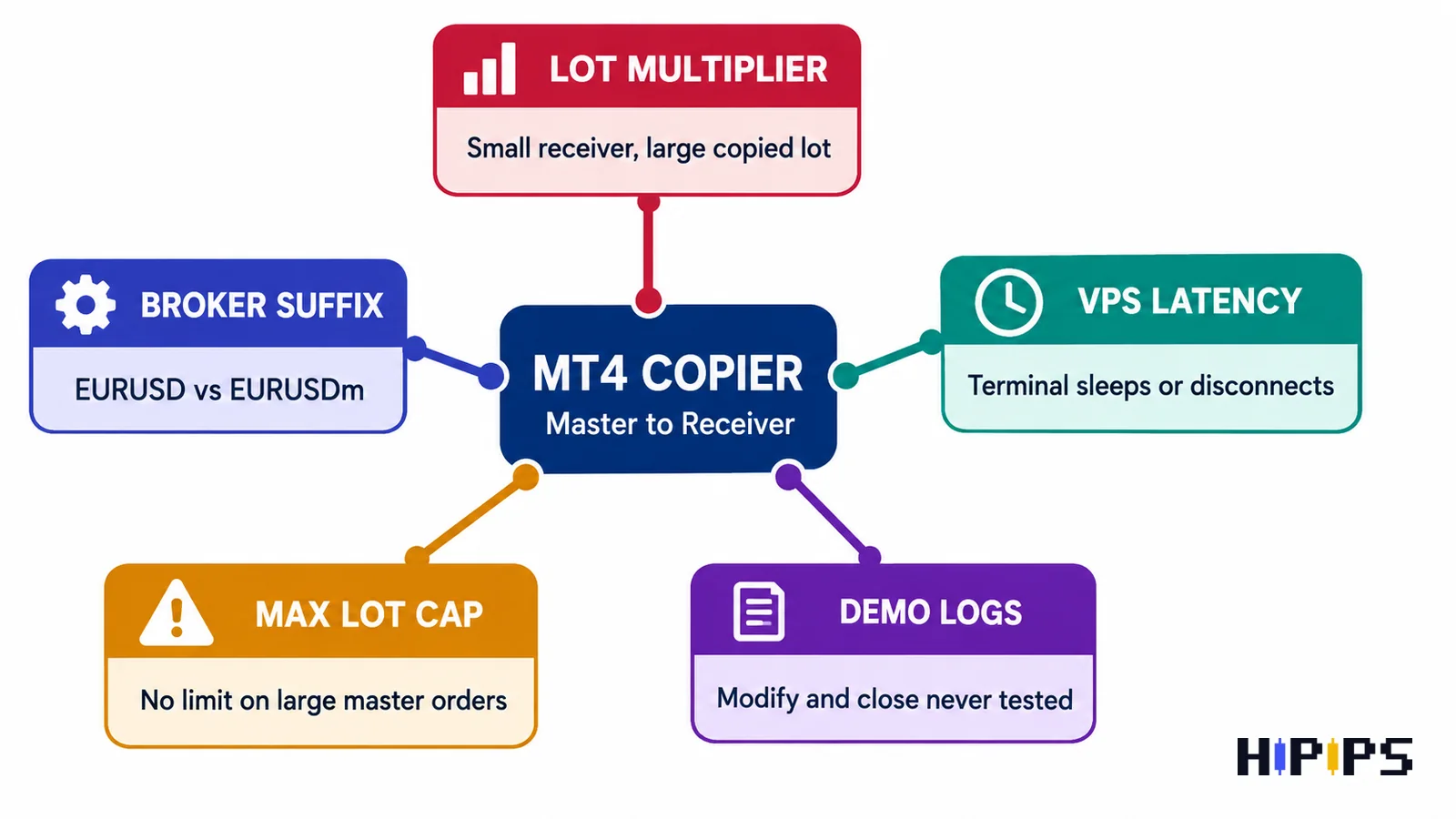
Most MT4 copy trading mistakes do not come from the idea of copying trades itself. They come from weak setup checks: wrong lot multiplier, broker suffix mismatch, unstable VPS, no max lot cap, and no demo log review before live copying. This guide is written for traders comparing LOCAL TRADE COPIER MT4 + MT5, account copier MT4 tools, or MT4 copy trader workflows.
Quick Answer
The biggest MT4 copy trading mistakes are copying the same lot size to a smaller receiver account, ignoring broker suffixes such as EURUSDm or XAUUSD.pro, running terminals on an unstable computer instead of a VPS, and moving to live accounts before testing open, modify, close, stop loss, take profit, and partial-close behavior. Use this page with the MT4 Copy Trade Copier hub and the MT4 setup guide.
Mistake 1: Using the Same Lot Size on Every Receiver
A master account and a receiver account rarely have the same balance, leverage, broker conditions, or risk tolerance. Copying 0.10 lots from a large master account into a small receiver account can create exposure that is too aggressive for the receiver.
| Master account | Receiver account | Risk mistake | Better setup |
|---|---|---|---|
| 10,000 USD | 1,000 USD | Same 0.10 lot copied to a smaller account | Fixed 0.01 lot or reduced multiplier |
| High leverage | Lower leverage | Receiver margin may be tighter | Use max lot cap and margin checks |
| Scalping master | Wide-spread receiver | Copied entry quality can differ | Demo test with spread logs |
Mistake 2: Choosing the Wrong Lot Multiplier
The lot multiplier is one of the highest-impact settings in any MT4 account copier. It decides whether a receiver account copies the master lot exactly, scales it down, or scales it up. Scaling up can make losses larger than expected, especially when the receiver account is smaller than the master.
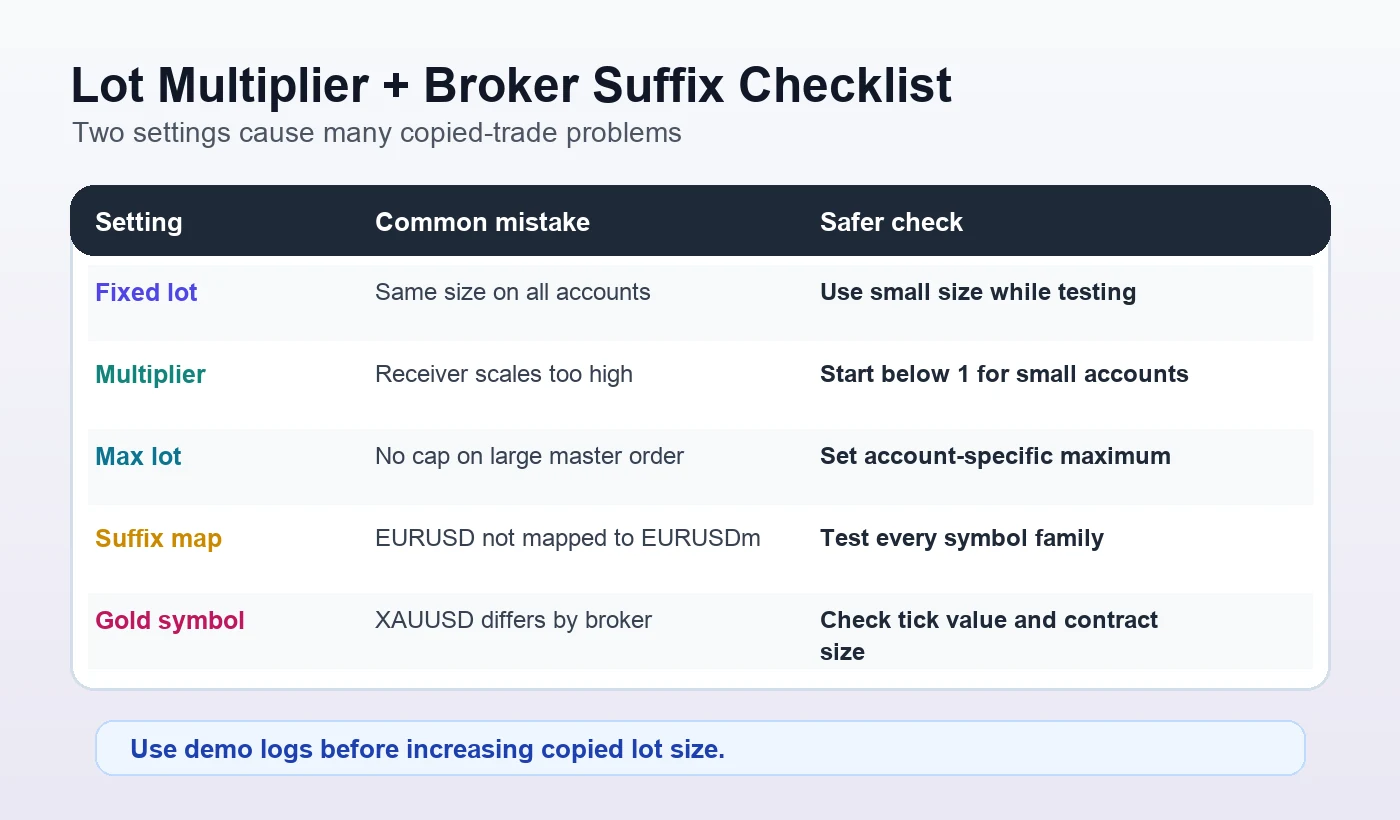
- Fixed lot: useful when the receiver account should always use one position size.
- Multiplier below 1: useful when the receiver should trade smaller than the master.
- Multiplier above 1: higher risk and should be demo-tested very carefully.
- Max lot: important because it prevents one unusually large master trade from overloading a receiver.
Mistake 3: Ignoring Broker Suffix and Symbol Mapping
Broker suffix mismatch is a quiet problem. One broker may use EURUSD, another may use EURUSDm, and another may use EURUSD.pro. For Gold, a broker may use XAUUSD, GOLD, XAUUSDm, or XAUUSD.pro. If the copier does not map symbols correctly, copied trades can fail or copy to the wrong market.
| Master symbol | Possible receiver symbol | Check before live copying |
|---|---|---|
| EURUSD | EURUSDm | Map suffix and contract size |
| GBPUSD | GBPUSD.pro | Confirm minimum lot and spread |
| XAUUSD | GOLD or XAUUSD.pro | Confirm tick value and contract specification |
| US30 | DJ30 or US30.cash | Confirm index naming and trading hours |
Mistake 4: Running Copy Trading Without a Stable VPS
Copy trading requires both sides of the workflow to stay online. If the master or receiver terminal disconnects, sleeps, restarts, or loses internet connection, copied trade behavior can become inconsistent. A VPS is not about making trades profitable. It is about keeping the copier environment stable enough to follow the rules.
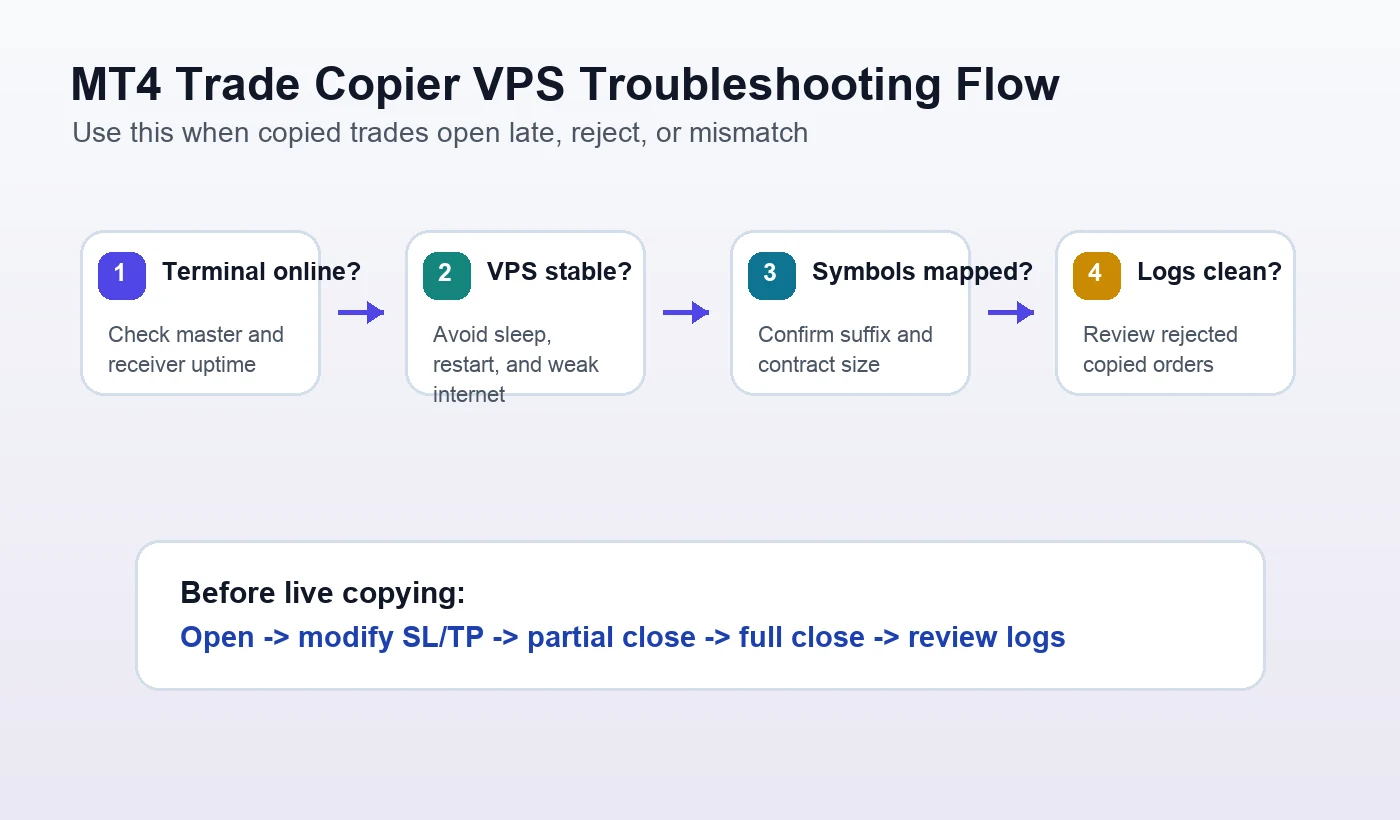
For deeper execution details, read the MT4 Trade Copier VPS and Latency Guide. That page supports this mistakes checklist with more detail on delay, receiver mismatch, and server stability.
Mistake 5: Not Testing Modify and Close Behavior
Many users test only the first copied order. That is not enough. A real copier workflow also needs to handle stop loss changes, take profit changes, partial closes, full closes, pending orders, and rejected orders.
- Open one small demo trade on the master account.
- Confirm the receiver opens the same direction and correct mapped symbol.
- Modify stop loss and take profit on the master.
- Check whether the receiver updates both values.
- Partially close the master trade if the copier supports it.
- Close the master trade and confirm the receiver closes.
- Review logs for rejected orders or symbol errors.
Mistake 6: Treating a Copier Like a Signal EA
A copier and a forex EA solve different problems. A copier replicates a source account. A forex EA creates or manages strategy signals. If a trader does not already have a master strategy, a copier alone is not enough. In that case, compare the Expert Advisor category or read MT4 Copy Trader vs Account Copier MT4.
| Need | Better page | Reason |
|---|---|---|
| Copy existing trades | Local Trade Copier MT4 + MT5 | The signal already exists on a master account |
| Learn setup sequence | How to Copy Trades in MT4 | Step-by-step master and receiver setup |
| Compare copier vs EA | MT4 Copy Trader vs Account Copier | Clarifies buyer intent |
| Choose MT4 products | MT4 product category | Useful if the trader needs an EA instead |
Mistake 7: No Written Pre-Live Checklist
A written checklist reduces repeated setup errors. It also improves trust on a product page because buyers can see that the copier is being positioned as infrastructure, not as a magic result.
- Master account selected and stable.
- Receiver account balance, leverage, and broker symbols checked.
- Lot multiplier, fixed lot, and max lot rules confirmed.
- Broker suffix mapping checked for every traded symbol.
- VPS uptime and terminal auto-login confirmed.
- Open, modify, close, SL, TP, and partial-close behavior tested on demo.
- Live size kept smaller until logs are stable.
Products to Compare After the Checklist
| Product | Best fit | Platform | Link |
|---|---|---|---|
| LOCAL TRADE COPIER MT4 + MT5 | Main product path for copying trades between master and receiver accounts. | MT4 + MT5 | View product |
| Trade Assistant EA MT4 | Useful when the trader needs manual order support instead of account replication. | MT4 | View product |
| Expert Prop Firms EA MT4 + SetFiles | Relevant when the buyer compares strict risk-rule automation and drawdown controls. | MT4 | View product |
| EURUSD Robot EA MT4 | Useful comparison when the buyer needs a signal EA rather than a copier. | MT4 | View product |
| Black Max Scalper | Alternative MT4 product path for users comparing scalping automation and copied trades. | MT4 | View product |
Recommended Internal Reading Path
Start with the MT4 Copy Trade Copier hub, then read How to Copy Trades in MT4, Copy Trades from One MT4 to Another, MetaTrader Account Copier, and MT4 Trade Copier VPS and Latency Guide. If you are still comparing tools, use the MT4 copy trading software buyer checklist.
Final Recommendation
The safest way to approach MT4 copy trading is to treat the copier as execution infrastructure. Do not rush from installation to live use. First solve lot size, suffix mapping, VPS stability, max lot, and demo logs. When those checks are clear, the product decision becomes easier and the visitor is more likely to trust the next step toward LOCAL TRADE COPIER MT4 + MT5.
FAQ
What are the most common MT4 copy trading mistakes?
The most common mistakes are wrong lot multiplier, no max lot cap, broker suffix mismatch, unstable VPS, and testing only order open behavior without checking modify and close behavior.
Why does broker suffix matter in MT4 copy trading?
Broker suffix matters because the master and receiver may use different symbol names. If EURUSD on the master becomes EURUSDm or EURUSD.pro on the receiver, the copier needs correct mapping.
Should I use fixed lot or multiplier lot?
Fixed lot is easier for controlled testing. Multiplier lot can be useful when account sizes differ, but it should start conservative and include a max lot cap.
Do I need a VPS for MT4 copy trading?
A VPS is strongly recommended for continuous copy trading because the master and receiver terminals need stable uptime and consistent connection.
Can an MT4 copier remove trading risk?
No. A copier replicates trade actions. It does not remove market risk, broker execution risk, drawdown risk, or poor master-account decisions.










