Worldwide Instant Access

Download your EA software from anywhere in the world.

Reliable & Tested

Each EA is thoroughly tested and optimized for best performance.

Rofa System Funding EA v2.2 MT4 With Setfile

$7.00

The Rofa System Funding EA is an Expert Advisor designed exclusively for trading on Meta Trader 4, with a focus on default currency pairs USDCHF, EURUSD, AUDNZD, and XAUUSD. It attains optimal performance on the M15 time frame and exclusively operates during the London or New York trading sessions. The setup process for the Expert Advisor is straightforward, enhancing user convenience.

👀 17 people are currently viewing this product.
SKU: Rofa-System-Funding-EA Categories: ,
Description

EA Quick Information
Rofa System Funding EA v2.2 MT4 With Setfile
Platform
MT4
Symbols
XAUUSD / Gold
Strategy
Scalping
Setfiles
Yes
Build Compatibility
Check product title and MetaTrader terminal build
Risk Controls
Lot size, stop loss, and drawdown behavior depend on EA settings
Martingale
Not specified; review EA settings
Timeframe
M15

What this EA information means

This quick table helps you review the important buying details before testing an Expert Advisor: platform, supported symbols, strategy type, setfiles, build compatibility, and risk-control notes.

Always test on demo first, use conservative lot sizing, and confirm that the included files match your MetaTrader version and broker symbol names.

  • Use the platform row to match MT4 or MT5 files.
  • Use the strategy row to understand whether the EA is scalping, grid, trend, breakout, recovery, or another model.
  • Use the risk rows to review lot size, stop loss, drawdown, and martingale behavior before live use.

What is Rofa System Funding EA?

The Rofa System Funding EA is an Expert Advisor designed exclusively for trading on Meta Trader 4, with a focus on default currency pairs USDCHF, EURUSD, AUDNZD, and XAUUSD. It attains optimal performance on the M15 time frame and exclusively operates during the London or New York trading sessions. The setup process for the Expert Advisor is straightforward, enhancing user convenience.

Vendor: https://rofatrade.com/?page_id=531

Rofa System Funding EA v2.2 MT4 With Setfile

Original Price:  $2000
HiPips Price: $7 (Discount 99%)

Key Takeaways:

Platform and Focus:

  • Rofa System Funding EA is an Expert Advisor tailored for Meta Trader 4.
  • Primarily designed for trading default currency pairs: USDCHF, EURUSD, AUDNZD, and XAUUSD.

Optimal Conditions:

  • Best performance observed on the M15 time frame.
  • Recommended usage during the London or New York trading sessions.

Ease of Use:

  • Straightforward Expert Advisor setup for user convenience.

Targeted Use Cases:

  • Specifically designed for Prop Firm and Challenge trading.
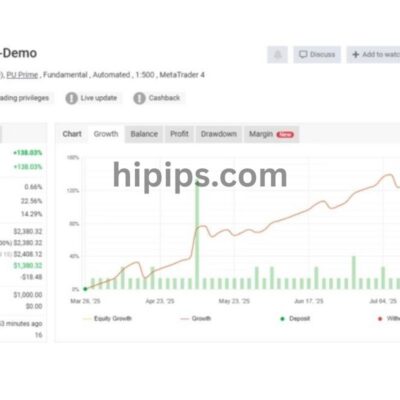
  • Demonstrates long-term success in its trading history.

Preset Settings:

  • Offers preset settings for various pairs, including EURUSD, AUDNZD, USDCAD, USDCHF, and XAUUSD.

Risk Management:

  • Risk level is based on the account size.
  • Recommends a fixed lot size ranging from 0.3 to a maximum of 1.5 for effective risk management.

Rofa System Funding EA Feature

Platform:

  • Meta Trader 4

Currency Pairs:

  • USDCHF, USDCAD, EURUSD, AUDNZD, XAUUSD

Time Frame:

  • M15

Sessions:

  • Expert Advisors run exclusively during the London or New York Sessions

Ease of Setup:

  • The EA setup is designed to be easy

How to install and run the Rofa System Funding EA Trading Bot

To install Rofa System Funding2 on MetaTrader 4, follow these steps:

  1. Open the MetaTrader 4 platform.
  2. From the top menu, click on “File.”
  3. Select “Open Data Folder.”
  4. Within the “MQL4” folder, locate and open the “Experts” folder.
  5. Copy the “Rofa System Funding2.ex4” file and paste it into the “Experts” folder.
  6. Close and restart the MetaTrader 4 platform.
  7. Attach the Expert Advisor to the chart of your chosen currency pair.

Now, you are ready to start using the Rofa System Funding2 on MT4!

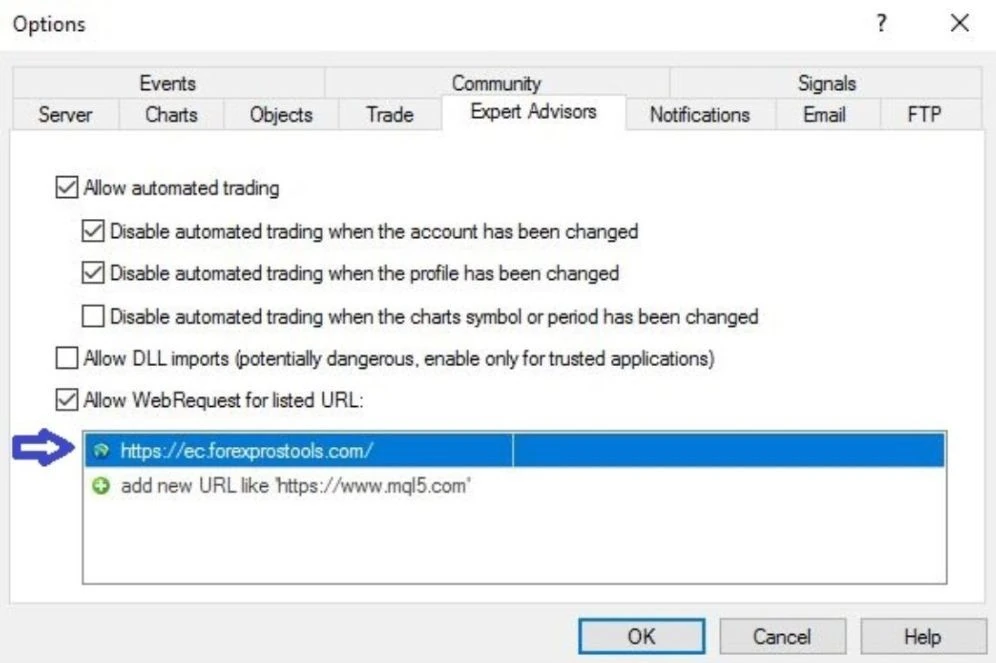
For setting up the news filter:

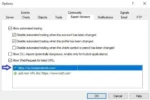
  1. Open the terminal menu by navigating to “Tools” >> “Options” >> “Expert Advisors.”
  2. Allow “Web Requests.”
  3. Add the news calendar link “https://ec.forexprostools.com/” to the list.

Rofa System Funding EA v2.2 MT4 With Setfile (1)

By following these steps, you will successfully set up the Rofa System Funding EA on MetaTrader 4 and configure the news filter for the specified setfile.

Rofa System Funding EA Download

Link download Rofa System Funding v2.2 MT4 will be sent to your email after payment.

+ Expert :

  • Rofa System Funding2.ex4 + 5 Presets + Instrucions Guide
  • Unlimited / NoDLL
  • Free Future Updates
    • RoFa System Funding2.ex4
    • USDCHF15new.set
    • USDCAD15new.set
    • EURUSD15new.set
    • AUDNZD15new.set
    • Gold Scalp – PROP.set

Shopping Guide and Important Information:

Please read and agree to our terms and conditions and policies before ordering.

Check EA on Demo Account:

  • The product does not guarantee profits and demands resilience, patience, and a positive attitude in forex trading.
  • Before use, please test the EA on a demo account first.
  • Profits are not guaranteed, and for success, risk management, emotional control, and a steadfast attitude are crucial.

Shipping and Delievery:

The product download link will be sent to your email ASAP. No physical products will be sent to your home.

  • 95% EAs is instant delivery:
    • The download link will be sent to your email within 5 minutes after the order is confirmed.
  • 5% Need to wait a bit to receive:
    • Some EAs will need to wait a few hours to up to 12 hours to receive the download link.

Thank you for visiting and shopping!


Reviews (0)

Reviews

There are no reviews yet.

Be the first to review “Rofa System Funding EA v2.2 MT4 With Setfile”

Your email address will not be published. Required fields are marked *


Worldwide Instant Access

Download your EA software from anywhere in the world.

Reliable & Tested

Each EA is thoroughly tested and optimized for best performance.