
MT4 trade copier: how to copy trades between MT4 accounts

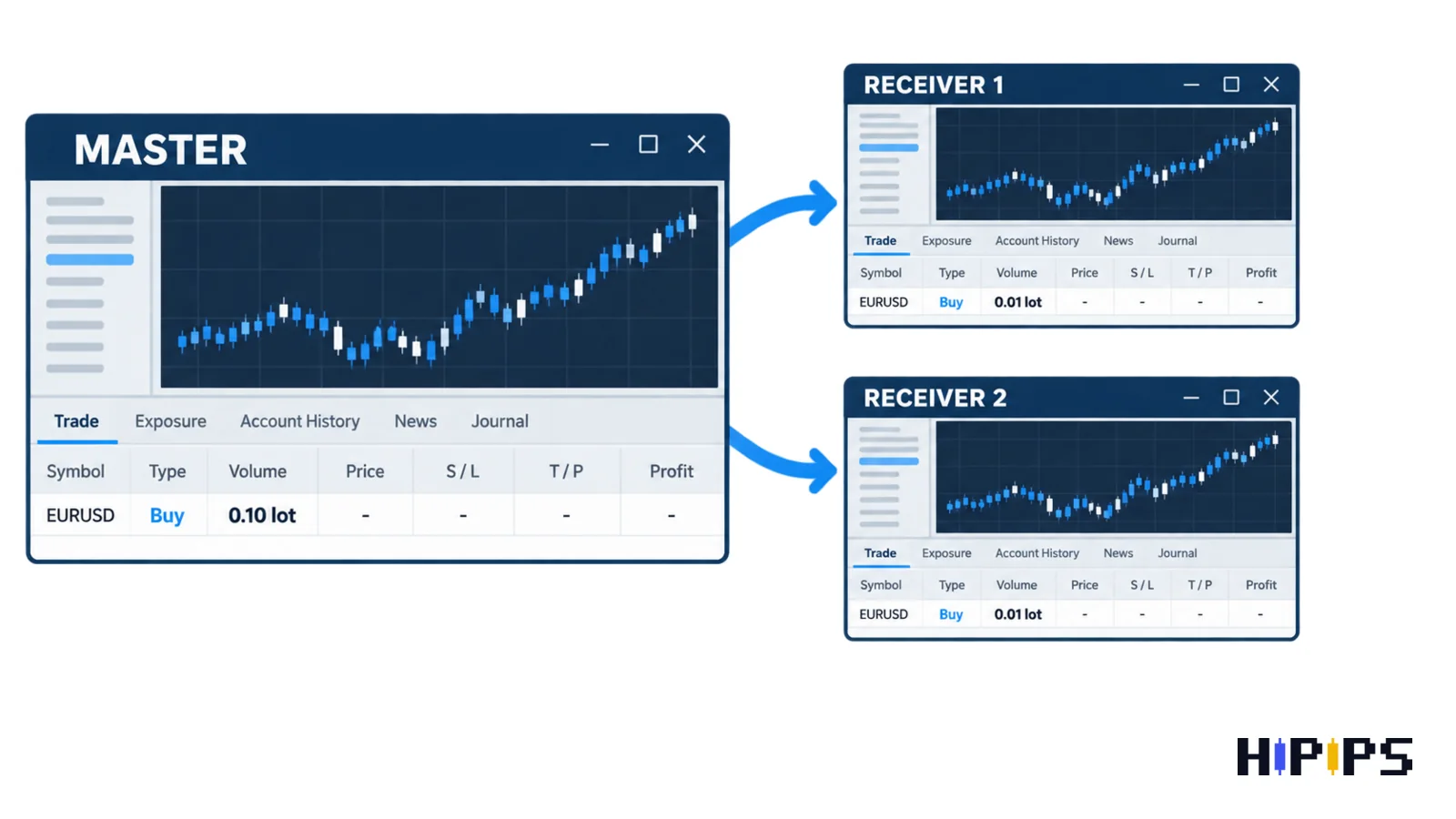
An MT4 trade copier is an Expert Advisor that reads every order on a master MetaTrader 4 account and sends a matching order to one or more receiver accounts, including stop loss, take profit and close events. Traders search for the same tool as copy trader MT4, MT4 account copier or local trade copier.
A trade copier copies execution only. The receiver account inherits the risk of the master strategy and adds its own spread, commission and delay. This guide explains how a copier works, the three ways to copy trades in MT4, the setup from one MT4 account to another, the settings that control receiver risk, symbol mapping, MT4 to MT5 copying, VPS hosting and the demo test to run before live copying. This guide is part of the HiPips path to choose, test and run an MT4 or MT5 Expert Advisor, which starts with what an Expert Advisor is.
What is an MT4 trade copier?
An MT4 trade copier is a utility Expert Advisor for MetaTrader 4 that duplicates orders between trading accounts instead of generating its own entry signals. The account that opens the original order is the master account, known as the provider or source account. The account that receives the copy is the receiver account, known as the slave, follower or client account.
A trade copier and a strategy Expert Advisor solve different problems. The comparison below shows which MT4 tool fits which copying need.
| MT4 tool | What opens the trade | What the tool controls | Fits a trader who |
|---|---|---|---|
| Trade copier | The master account (manual trades or another Expert Advisor) | Replication, lot scaling, symbol mapping | Already has a source strategy and several accounts |
| Strategy Expert Advisor | Entry and exit rules coded in MQL4 | Entries, exits, position size | Still needs a source strategy |
| Signals subscription | A provider account published on MQL5.com | Deposit load, equity stop, slippage | Wants to follow another trader’s MT4 account |
A trader without a tested source strategy needs a strategy Expert Advisor before a trade copier, because a copier repeats whatever the master account does. The way a copier repeats each order explains most copying problems.
How does an MT4 trade copier work?
An MT4 trade copier works in three stages: the master component detects a trade event, the copier transfers the event, and the receiver component sends a new order to the receiver’s broker.
A local trade copier transfers events through files on one computer. MQL4 programs can only read and write files inside the terminal’s file sandbox, and the FILE_COMMON flag opens a folder shared by all client terminals, Terminal\Common\Files, according to the MQL4 FileOpen reference. The master component writes each open, modify and close event into that shared folder, and the receiver component on the second terminal reads it. A remote copier, often sold as a cloud copier, sends the same events through the vendor’s server, so the master and receiver accounts can run on different computers.
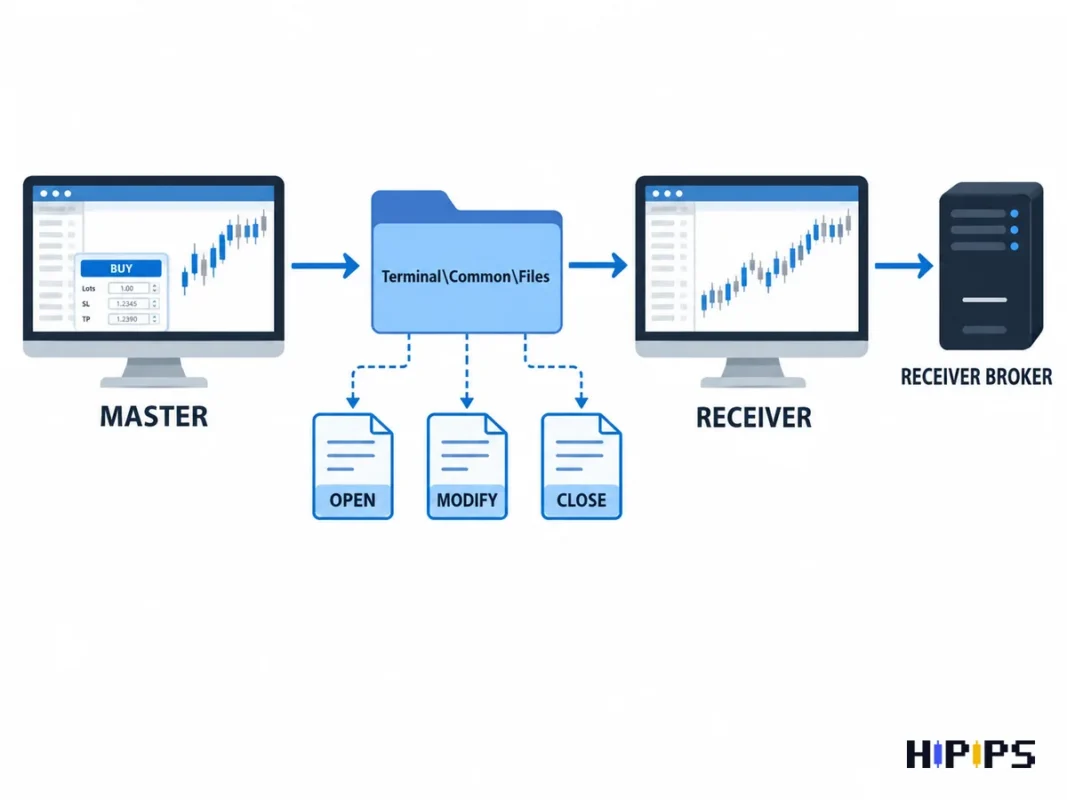
Every copied trade is a new order at the receiver’s broker. The receiver order fills at the receiver’s current price, so its entry price differs from the master entry by the copy delay, the spread difference between brokers and any slippage. The table below compares the two copier designs.
| Copier factor | Local trade copier | Remote (cloud) copier |
|---|---|---|
| Where it runs | Master and receiver terminals on one Windows computer or VPS | Vendor server between accounts in any location |
| Event transfer path | Shared files in Terminal\Common\Files | Internet connection to the vendor server |
| Main delay source | Copier check interval plus receiver execution | Server round trip plus receiver execution |
| Typical copying use | Own accounts on one VPS | Accounts on different machines or signal distribution |
What are the ways to copy trades in MT4?
MetaTrader 4 offers three ways to copy trades: the MQL5 Signals service built into MetaTrader 4, a local trade copier, and a remote copier service. The three copying methods are listed below.
- MQL5 Signals service: the receiver account subscribes to a signal published from the master account on MQL5.com, and the MT4 terminal copies the trades itself.
- Local trade copier: a master Expert Advisor and a receiver Expert Advisor run on two MT4 terminals on the same computer or VPS.
- Remote copier service: the vendor’s server connects master and receiver accounts that run on different machines.
The Signals service has three limits for copying between your own MT4 accounts. An MT4 account can subscribe only to signals from the MetaTrader 4 section, and one trading account can subscribe to one signal only, according to the MQL5 Signals rules. The subscribed platform must stay connected to the trade server for copying to run, which the same rules state. The master account must be published as a signal on MQL5.com, so a trader who wants the master account kept private uses a local or remote copier.
The Signals copy settings work as a reference for any MT4 copier. MetaTrader 4 offers “Use no more than” a percentage of the deposit, “Stop if equity is less than” a set amount, a deviation limit measured in spreads and an option to copy Stop Loss and Take Profit levels, according to the MetaTrader 4 Signals settings help. The equity stop closes all copied positions and removes pending orders when equity drops below the set level.
How to copy trades from one MT4 account to another
Copying trades from one MT4 account to another with a local trade copier takes nine steps, from a second terminal installation to a demo test. The nine steps are listed below.
- Install a second MT4 terminal in a separate folder, because one running terminal is logged in to one trading account at a time.
- Log in to the master account in the first terminal and to the receiver account in the second terminal.
- Enable “Allow automated trading” in Tools > Options > Expert Advisors on both terminals.
- Attach the master (sender) component of the copier to one chart in the master terminal.
- Attach the receiver component to one chart in the receiver terminal and select the master account as its source.
- Choose the lot mode: fixed lot, multiplier or balance-proportional volume.
- Map every symbol whose name differs between the two brokers, such as XAUUSD to XAUUSD.pro.
- Set a maximum lot and the list of symbols the receiver may copy.
- Run the demo test described later in this guide before a live account becomes a receiver.
Automated trading must be enabled on the receiver terminal. With automated trading disabled, Expert Advisors keep running but cannot trade, according to the MetaTrader 4 Expert Advisors settings help. Each copier component installs like any other Expert Advisor, and the guide on how to install an Expert Advisor in MT4 covers the Data Folder, the Navigator and the AutoTrading button. Run one copier per receiver account, because two copiers attached to the same receiver open duplicate orders.
Which copier settings control risk on the receiver account?
Receiver risk in an MT4 trade copier is controlled by six settings: lot mode, maximum lot, stop loss and take profit copying, slippage tolerance, symbol filter and equity stop.
Lot mode decides the copied volume. The example below uses a master account with a $10,000 balance that opens 0.10 lot and a receiver account with a $1,000 balance.
| Lot mode | Copier rule | Receiver volume | Receiver exposure relative to its balance |
|---|---|---|---|
| Same lot | Copy the master volume | 0.10 lot | 10 times the master’s relative exposure |
| Multiplier 0.1 | Master volume × 0.1 | 0.01 lot | Equal to the master |
| Balance-proportional | Master volume × (1,000 / 10,000) | 0.01 lot | Equal to the master |
| Fixed lot | Always 0.01 lot | 0.01 lot | Independent of the master volume |
Same-lot copying is the classic copier mistake on a small receiver account: a 0.10 lot position on a $1,000 balance carries ten times the relative exposure of the same position on $10,000.
Scaled volumes below the broker’s minimum lot need a rounding rule. A master order of 0.03 lot scaled by 0.1 gives 0.003 lot, which a broker with a 0.01 lot minimal volume cannot accept. The copier then skips the order or rounds it up to 0.01 lot, which is more than three times the intended size. The minimal volume and volume step of every symbol appear in the symbol properties, according to the MetaTrader 4 Market Watch help, so check both values on the receiver account and the rounding rule in the copier manual.
The other five receiver settings are listed below.
- Maximum lot: a hard cap on each copied order, so one oversized master order cannot exceed the receiver’s planned volume.
- Stop loss and take profit copying: the master’s exit levels copied to the receiver order; without this setting, the receiver closes only when the master closes.
- Slippage tolerance: the largest price difference the receiver accepts; MetaTrader 4 Signals measures this deviation in spreads.
- Symbol filter: the list of symbols the receiver may copy, so a small receiver can skip XAUUSD or index orders.
- Equity stop: a receiver equity level that stops copying and closes copied positions, the same logic as the Signals option “Stop if equity is less than”.
Position size rules for the master strategy belong to the master account, and the guide to Expert Advisor risk settings covers lot size, drawdown and equity stops for that side.
How do broker suffixes and contract sizes change copied trades?
Broker suffixes and contract sizes change copied trades because each broker names and sizes the same instrument by its own contract specification.
Symbol names vary between brokers and account types. A copier without symbol mapping sends an order for a symbol the receiver terminal does not have, and MT4 returns error 4106, Unknown symbol, according to the MQL4 error code list. The mapping examples below show the usual naming patterns.
| Master symbol | Receiver symbol examples | Mapping rule |
|---|---|---|
| EURUSD | EURUSDm, EURUSD.pro, EURUSD.raw | Add the receiver suffix |
| XAUUSD | GOLD, XAUUSD.pro, XAUUSDm | Map by name, then compare contract size |
| US30 | US30.cash, DJ30 | Map by name, then compare contract size and trading hours |
Contract size decides how much one lot is worth. Two brokers can quote XAUUSD with different contract sizes, so the same 0.10 lot carries different exposure on the master and on the receiver. Open Market Watch, right-click the symbol and choose Specification to compare contract size, stops level, digits and margin calculation mode on both accounts, according to the MetaTrader 4 contract specification help.
Stops level is the minimum distance in points between the current price and a stop loss or take profit. A receiver broker with a larger stops level than the master broker rejects copied stops with error 130, Invalid stops, and the guide to error 130 invalid stops lists the fixes.
Can you copy trades from MT4 to MT5?
Copying trades from MT4 to MT5 works with a trade copier that has an MT4 master component and an MT5 receiver component. The Signals service cannot do this, because the MQL5 Signals rules let an MT4 account subscribe only to MT4 signals and an MT5 account only to MT5 signals.
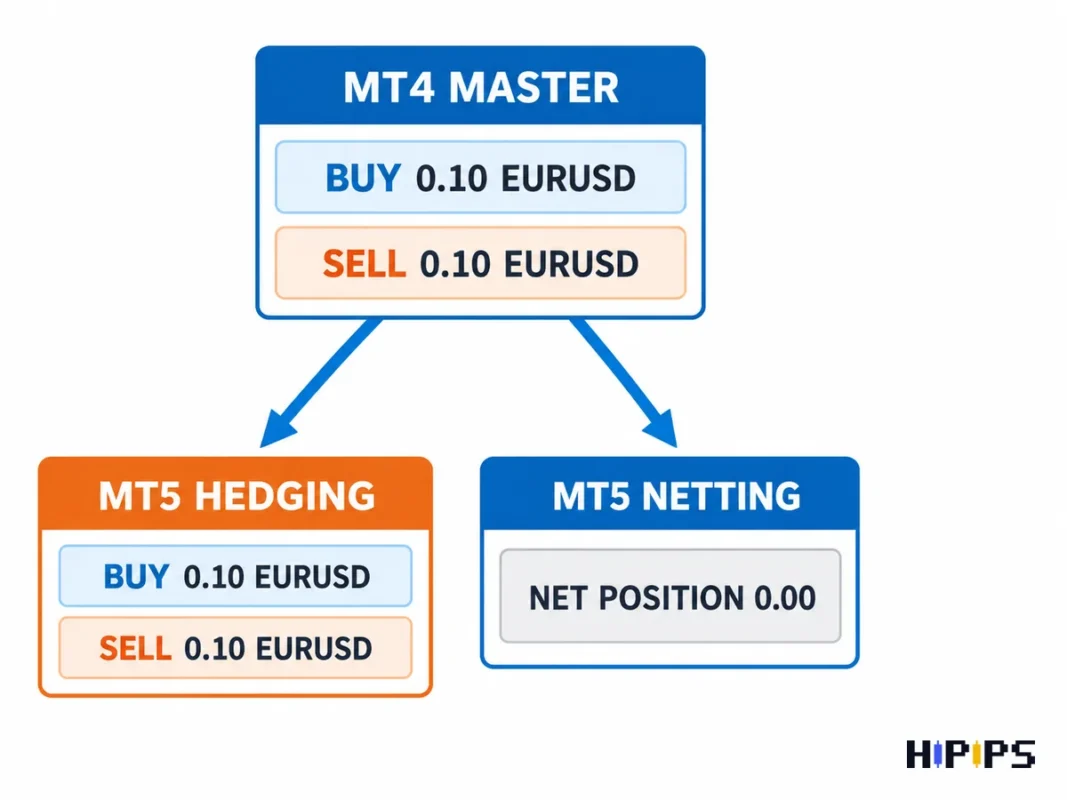
The MT5 receiver account type decides whether copied positions stay separate. MetaTrader 5 supports a netting system with only one common position per symbol and a hedging system with multiple positions per symbol, including opposite positions, according to the MetaTrader 5 help on trading principles. An MT4 master holding a 0.10 lot buy and a 0.10 lot sell on EURUSD becomes no position at all on a netting receiver. Use a hedging MT5 account as the receiver for an MT4 master.
Other platform differences that affect automated trading, from order handling to the Strategy Tester, are compared in MT4 vs MT5 Expert Advisors.
Does an MT4 trade copier need a VPS?
An MT4 trade copier needs a VPS for continuous copying, because the master and receiver terminals must stay online for every open, modify and close event.
A local copier shares files through the Common folder of one computer, so the master and receiver terminals run on the same Windows machine or the same VPS. A home computer that sleeps, restarts for updates or loses its connection stops the copier, and the receiver misses close events while the master positions keep moving.
Network latency adds to the entry difference between master and receiver. MetaQuotes Virtual Hosting runs Expert Advisors and Signals subscriptions and lets the trader select the server closest to the broker to minimize network latency, according to the MetaTrader 4 Virtual Hosting help. A third-party Windows VPS follows the same principle: choose the location nearest to the broker’s trade servers. Copy delay matters most for scalping and XAUUSD strategies, because their profit targets are small and gold prices move fast around news. Server location, uptime and sizing for MT4 and MT5 are covered in forex VPS for Expert Advisors.
How to test a trade copier before live copying
A trade copier test on demo accounts checks the full life cycle of an order: open, modify, partial close, full close and pending orders. The test sequence is listed below.
- Open a 0.01 lot market order on the master and confirm the receiver opens the same symbol, direction and expected lot.
- Move the master stop loss and take profit and confirm the receiver updates both levels.
- Close part of the master position, if the copier supports partial closes, and confirm the receiver closes the same proportion.
- Close the master order and confirm the receiver closes its copy.
- Place and delete a pending order, if the master strategy uses pending orders.
- Repeat the sequence for every symbol family the master trades: a forex pair, XAUUSD and an index.
- Restart the receiver terminal while a master position is open and confirm the copier reconnects without a duplicate order.
- Read the Experts and Journal tabs of both terminals for rejected orders.
Rejected copied orders show an MQL4 error code in the Experts tab. The table below lists the codes behind common copier rejections, with names from the MQL4 error code list.
| MQL4 code | Error name | Usual copier cause |
|---|---|---|
| 130 | Invalid stops | Receiver stops level larger than the copied stop distance |
| 131 | Invalid trade volume | Scaled lot below the minimum or off the volume step |
| 134 | Not enough money | Receiver margin too small for the copied lot |
| 146 | Trade context is busy | Another Expert Advisor on the receiver sending an order at the same moment |
| 4106 | Unknown symbol | Missing suffix mapping on the receiver |
| 4109 | Trade is not allowed | Automated trading disabled on the receiver terminal |
Record the entry price difference between master and receiver for each test order. A receiver that misses any modify or close event is not ready for a live account. A wider list of copier setup errors, from lot multipliers to broker suffixes, is in MT4 copy trading mistakes.
Is copy trading profitable?
Copy trading is profitable only when the master strategy stays profitable after the receiver’s own spread, commission, swap and slippage. A trade copier adds no trading edge, since it repeats the master account’s decisions at a slightly different price. Past results of a master account do not guarantee future results, and margin trading can lose the receiver’s whole deposit. Judge the source strategy with verified history before copying it; the guide on how to verify a forex robot before buying explains Myfxbook checks, backtests and red flags.
Is copy trading legal?
Copy trading is a legal platform function, and MetaQuotes builds signal copying into MetaTrader 4 through the Signals service. Copying trades into other people’s accounts for payment is a regulated activity in several jurisdictions. In the United States, an individual or organization that, for compensation or profit, advises others on retail off-exchange forex contracts is a Commodity Trading Advisor, according to the National Futures Association, and registration applies unless an exemption fits. Prop firms set their own copy trading rules for funded accounts, so check the prop firm Expert Advisor rules before a funded account becomes a receiver.
Which MT4 trade copier should you choose?
The right MT4 trade copier supports your platforms, lot modes and symbol names, and passes the demo test above without a missed event. The selection criteria are listed below.
- Platform support: MT4 to MT4, MT4 to MT5, or both directions.
- Lot modes: fixed lot, multiplier and balance-proportional volume, with a maximum lot.
- Symbol mapping: suffix rules plus manual symbol pairs.
- Exit handling: stop loss, take profit, partial close and pending orders.
- Copier location: a local copier on one VPS or a remote copier across machines.
- Copy logs: a record of every copied and rejected order.
A side-by-side buyer checklist for copier software is in best MT4 copy trading software, and HiPips groups copiers and account utilities in the trade copiers and tools for MetaTrader category.










