
What is an Expert Advisor? MT4 and MT5 Expert Advisors explained

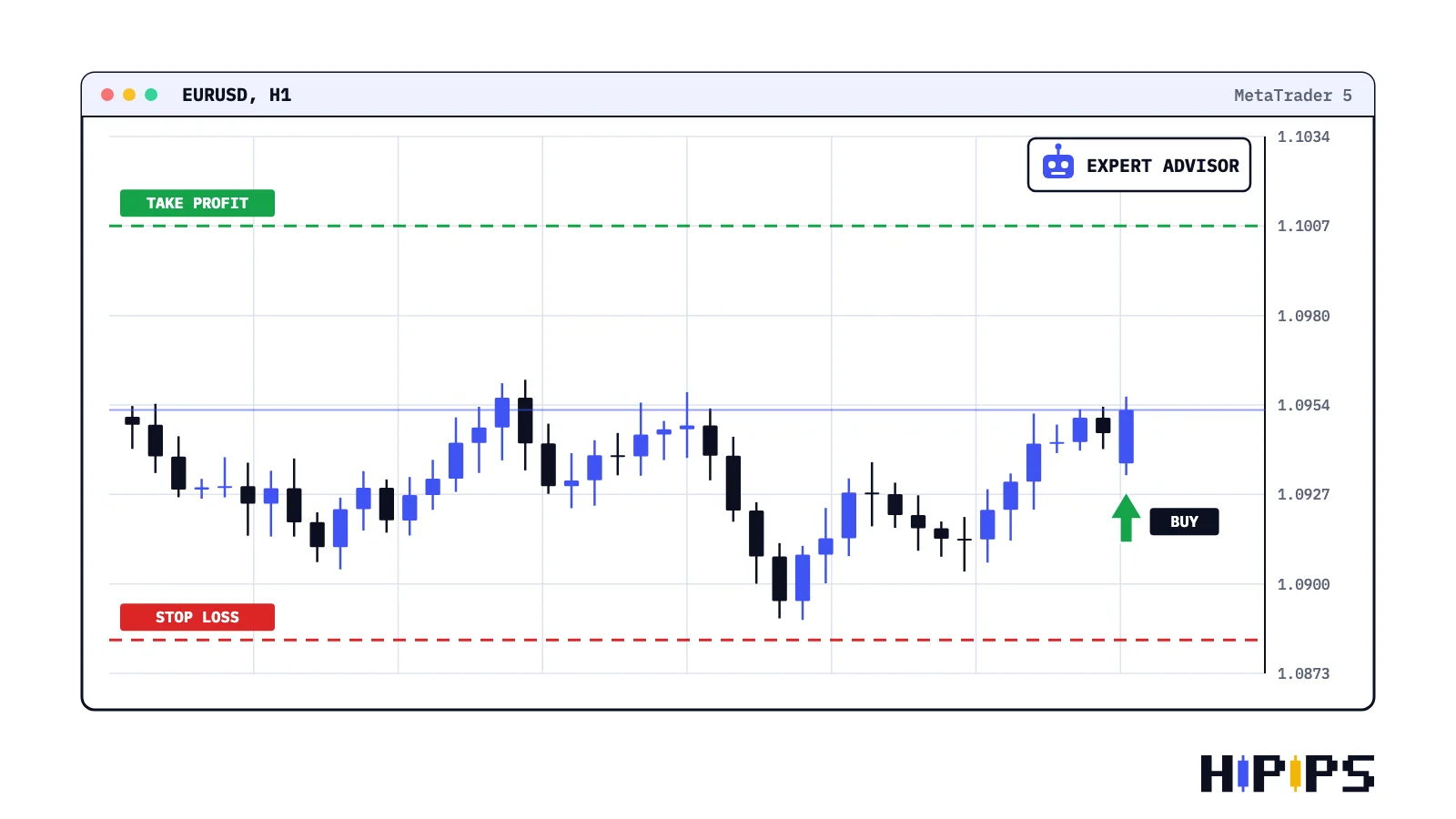
An Expert Advisor is a program written in MQL4 or MQL5 that runs on a MetaTrader 4 or MetaTrader 5 chart, analyses prices by preset rules, and opens, manages and closes trades without manual clicks. MetaTrader calls these trading robots Expert Advisors, often shortened to EA.
An Expert Advisor automates a strategy and keeps the strategy’s risk. This guide explains how an Expert Advisor works, how it differs from an indicator and a script, the main types, and the path the HiPips guides follow to choose, test and run an MT4 or MT5 Expert Advisor with defined risk.
What is an Expert Advisor in MetaTrader?
An Expert Advisor in MetaTrader is a program developed in MQL4 for MetaTrader 4 or in MQL5 for MetaTrader 5 that automates analysis and trading on the chart it is attached to.
MetaTrader 4 help describes Expert Advisors as programs developed in MQL4 and used for automation of analytical and trading processes, according to the MetaTrader 4 help on Expert Advisors. MetaTrader 5 help calls them trading robots that analyse prices based on preset algorithms, make decisions and execute trading operations, according to the MetaTrader 5 help on algorithmic trading. An MT4 Expert Advisor ships as a compiled .ex4 file (source code .mq4), and an MT5 Expert Advisor as a compiled .ex5 file (source code .mq5); each runs only on its own platform.
One chart runs one Expert Advisor at a time. MQL5 documentation states that attaching a new Expert Advisor to a chart unloads the Expert Advisor already attached there, according to the MQL5 reference on program running, so traders who run several MT4 and MT5 Expert Advisors open one chart for each.
How does an Expert Advisor work?
An Expert Advisor works by reacting to platform events: it initializes when attached to a chart, runs its logic when a new price tick arrives, and sends trade requests when its rules are met.
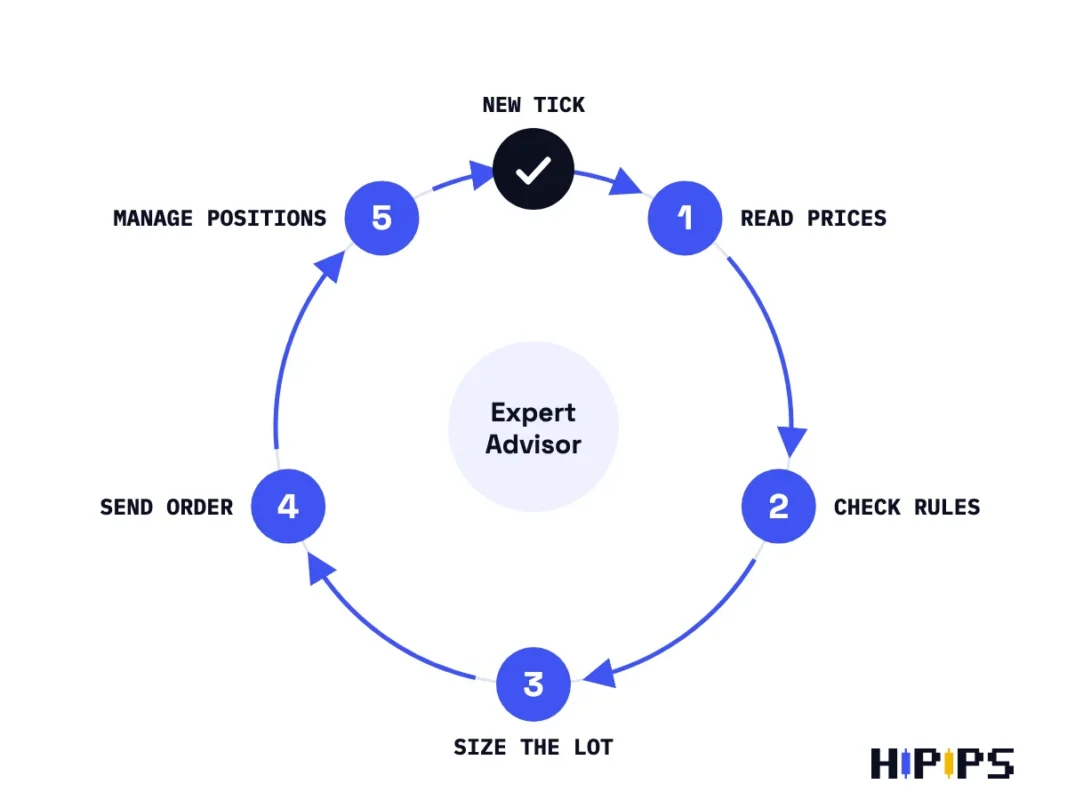
MQL5 names these events with handler functions. OnInit runs right after the Expert Advisor loads, OnTick runs when a new tick arrives for the chart’s symbol, OnTimer runs at an interval the program sets, and OnDeinit runs before the program unloads, according to the MQL5 reference on event handlers. On each tick, a trading Expert Advisor repeats the cycle below.
- Read the current price, spread and the indicator values its rules use.
- Check its entry and exit rules, plus filters such as maximum spread, trading hours and news pauses.
- Calculate the lot size from its risk inputs.
- Send the order with a stop loss, a take profit and its magic number.
- Manage open positions: move stops, close part of a position or close a basket.
The magic number is the Expert Advisor’s ID on its orders. Each Expert Advisor can set its own unique ID when it sends a trade request, which lets it find and manage only its own orders, according to the MQL5 trade request reference. Two Expert Advisors on one account need different magic numbers, or one closes the other’s trades.
An Expert Advisor trades only while the terminal is open, connected and allowed to trade. The AutoTrading or Algo Trading button must be on, the Expert Advisor’s own permission ticked, and the account logged in with its master password. When any of these is off, the Expert Advisor runs without trading, and the checklist for an Expert Advisor not trading finds the cause. An Expert Advisor that must trade around the clock runs on a server, which forex VPS for Expert Advisors explains.
How is an Expert Advisor different from an indicator or a script?
An Expert Advisor differs from an indicator and a script in what it can do: an Expert Advisor runs continuously and trades, an indicator calculates and draws without trading, and a script runs once and stops.
MQL5 documentation states that trade functions can be used in Expert Advisors and scripts, according to the MQL5 trade functions reference, and that a script is unloaded as soon as it completes its operation, according to the MQL5 reference on program running. The table below compares the three program types.
| MetaTrader program | How long it runs | Can it trade? | Typical use |
|---|---|---|---|
| Expert Advisor | Continuously, on every tick and timer event | Yes | Automated strategy, trade management, trade copying |
| Custom indicator | Continuously, recalculating on new data | No | Signals, levels and filters drawn on the chart |
| Script | Once, then unloads | Yes, one action | Close all positions, place a set of orders |
An Expert Advisor can read a custom indicator for its signals. The indicator draws and calculates, and the Expert Advisor makes the trading decision, so an Expert Advisor that depends on a custom indicator needs both files installed to work.
What types of Expert Advisors are there?
Expert Advisors fall into two groups by function, trading Expert Advisors and utility Expert Advisors, and trading Expert Advisors split further by strategy type.
The functional types are listed below.
- Trading Expert Advisor: opens and closes positions by its own strategy rules.
- Trade manager: manages trades the trader opens by hand, with stop loss, take profit, trailing stop and partial close.
- Trade copier: copies orders from a master account to receiver accounts; the guide to the MT4 trade copier explains the setup.
- Account guard: closes positions or stops trading when equity or daily loss reaches a set level.
Trading Expert Advisors are grouped by the logic that opens trades. The table below lists the common strategy types and the risk each carries.
| Strategy type | How it trades | Main risk |
|---|---|---|
| Trend or swing | Follows a direction for hours or days | Wide stops, long losing streaks in ranges |
| Scalping | Many short trades with small targets | Spread, commission and slippage |
| Breakout | Enters when price leaves a range | False breakouts around news |
| Grid | Opens orders at set price steps | Exposure grows while price trends against the grid |
| Martingale | Raises the lot after each loss | Lot size and margin grow fast in a losing streak |
Grid and scalping Expert Advisors are compared in grid vs scalping Expert Advisors, recovery lot growth in martingale Expert Advisors, and range logic in MT5 breakout Expert Advisors. Market-specific Expert Advisors need their own checks for gold, index and crypto symbols, and the guide to a Bitcoin Expert Advisor for MT5 shows how contract size and weekend hours change the settings.
Is a forex robot the same as an Expert Advisor?
A forex robot is the general name for automated forex trading software, and an Expert Advisor is the MetaTrader form of it: a forex robot written in MQL and run inside MT4 or MT5.
Every Expert Advisor that trades forex is a forex robot, while a forex robot built for another platform is not an Expert Advisor and does not run in MetaTrader. Vendors and forums use the two names interchangeably, so check the platform and file type before treating a “forex robot” as an MT4 or MT5 Expert Advisor.
MT4 or MT5 Expert Advisor: which platform?
The platform of an Expert Advisor follows the broker account and the Expert Advisor’s own file: an .ex4 file needs an MT4 account and an .ex5 file needs an MT5 account. MT5 adds a multi-currency Strategy Tester, real-tick testing, netting or hedging accounts and a built-in economic calendar; MT4 vs MT5 Expert Advisors compares the differences that matter for automated trading.
How to choose an Expert Advisor
Choosing an Expert Advisor starts with evidence: a verified live record, a documented strategy type and risk inputs that fit your account and broker.
The selection checks are listed below.
- Verified history: a live account monitored by a third-party service, with equity drawdown shown.
- Documentation: platform, build, symbols, timeframe, strategy type and required permissions.
- Risk inputs: lot size or risk percentage, stop loss, maximum lot and an equity stop.
- Broker fit: spread, stops level, contract size and symbol names that match the setfile.
- Test result: a backtest and a demo run that agree with the live record.
The guide on how to verify a forex robot before buying covers the live-record checks, and the method for MT5 is in choose an MT5 Expert Advisor. Gold has its own contract maths, covered in the guide on how to choose an XAUUSD Expert Advisor. HiPips lists its MT4 and MT5 Expert Advisors by platform, symbol and strategy type.
How to test an Expert Advisor before using it
Testing an Expert Advisor before using it takes three stages: a backtest in the Strategy Tester, a forward test on a demo account, and a small live run with the equity stop active.
A backtest shows how the rules behaved on history, a demo forward test shows how they behave on your broker’s live prices, and the small live run shows real execution. Read the equity drawdown and the longest losing streak at each stage, not only the profit. The guide on how to backtest an MT5 Expert Advisor gives the tester settings that match live conditions.
How to install and run an Expert Advisor
Running an Expert Advisor takes four things: the right platform file installed in the terminal, a setfile loaded for your broker and account, automated trading switched on, and a terminal that stays online.
The installation steps differ by platform, and the guides to install an Expert Advisor and setfiles in MT5 and to install an Expert Advisor and setfiles in MT4 cover each one. An Expert Advisor that imports DLL functions needs an extra permission and cannot run on MetaQuotes Virtual Hosting; no-DLL Expert Advisors explains the difference.
How to control the risk of an Expert Advisor
The risk of an Expert Advisor is controlled by its inputs and by the account it runs on: lot size or risk percentage, stop loss, maximum lot, daily loss limit and equity stop.
Trading on margin can lose the whole deposit, and a profitable backtest does not guarantee future results. Size each trade from the money you accept to lose, cap the largest position, and set an account-level stop that closes everything at a set equity. The lot formula and the drawdown maths of a losing streak are in Expert Advisor risk settings. Funded accounts add daily and maximum loss floors and news windows, covered in prop firm Expert Advisor rules.
Do Expert Advisors work?
An Expert Advisor executes its rules exactly as coded, and whether it makes money depends on the strategy, the broker’s conditions and the risk settings, not on the automation itself. Automation removes hesitation and missed entries; it does not turn a losing strategy into a winning one. The broader question for any automated system is answered in the guide on whether forex robots work.
Can you create your own Expert Advisor?
You can create your own Expert Advisor in MetaEditor, the code editor that comes with MetaTrader. The MQL5 Wizard in MetaEditor builds a working Expert Advisor from ready-made signal, trailing stop and money management modules without programming, according to the MetaEditor help on the MQL5 Wizard; rules beyond those modules need MQL4 or MQL5 code.
Can an Expert Advisor run on a phone?
An Expert Advisor does not run in the MetaTrader apps for Android or iPhone; it runs in the desktop terminal on a computer or a Windows VPS, and the phone app monitors the positions it opens.
Where to go next in the Expert Advisor guides
Every HiPips guide on choosing, testing and running MT4 and MT5 Expert Advisors is grouped by topic in the HiPips Expert Advisor Guide, from basics and verification to risk, symbols, prop firm accounts and trade copiers.










