
MT4 vs MT5 Expert Advisors: the differences that matter before you choose

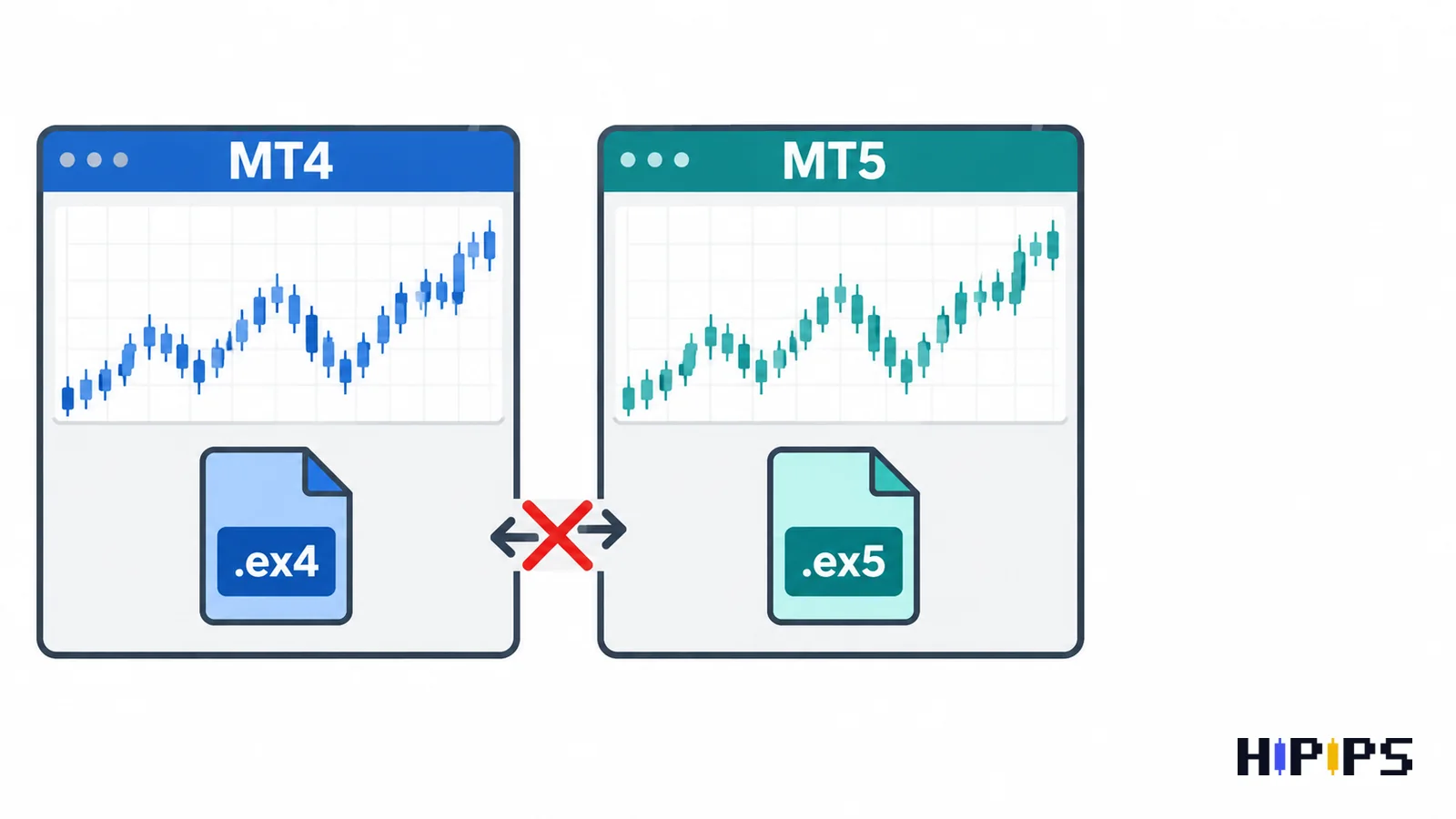
MT4 and MT5 Expert Advisors differ in four ways that matter to a trader: file type, order and position model, Strategy Tester, and the market data an Expert Advisor can read. The platform to choose follows the broker account and the Expert Advisor’s own file.
An MT4 Expert Advisor never runs on MT5, and an MT5 Expert Advisor never runs on MT4, so the platform decision comes before the Expert Advisor decision. This guide compares the two platforms for automated trading, explains why an MT4 Expert Advisor cannot run on MT5, shows how each platform handles orders and positions, compares their testers and news data, and ends with a decision list. This guide is part of the HiPips path to choose, test and run an MT4 or MT5 Expert Advisor, which starts with what an Expert Advisor is.
What is the difference between an MT4 and an MT5 Expert Advisor?
An MT4 Expert Advisor is a program written in MQL4 and compiled to an .ex4 file for MetaTrader 4, while an MT5 Expert Advisor is written in MQL5 and compiled to an .ex5 file for MetaTrader 5; the two languages and file types are not interchangeable.
The platforms around the Expert Advisor differ as well. MetaTrader 4 offers 9 timeframes, 4 pending order types and 3 execution modes, according to the MetaTrader 4 platform page. MetaTrader 5 offers 21 timeframes, 6 pending order types, 4 execution modes, both netting and hedging position accounting and a built-in economic calendar, according to the MetaTrader 5 platform page. The table below lists the differences an Expert Advisor depends on.
| Property | MT4 Expert Advisor | MT5 Expert Advisor |
|---|---|---|
| Language and file | MQL4, .mq4 source, .ex4 compiled | MQL5, .mq5 source, .ex5 compiled |
| Timeframes | 9 | 21 |
| Pending order types | 4 | 6 |
| Execution modes | 3 | 4 |
| Position accounting | Each order separate | Netting or hedging, set per account |
| Strategy Tester | One symbol per test | Multi-currency, multi-threaded, real ticks |
| Economic calendar in code | Not built in | MQL5 calendar functions |
Can an MT4 Expert Advisor run on MT5?
An MT4 Expert Advisor cannot run on MT5, because MT5 loads only .ex5 files compiled from MQL5 code, and an .ex4 file cannot be converted into an .ex5 file.
Moving a strategy from MT4 to MT5 means rewriting its MQL4 source code in MQL5. MQL5 replaces MQL4’s predefined Ask, Bid, Bars and price arrays with functions, changes the numeric values of timeframe constants, and returns indicator handles that the code reads with CopyBuffer instead of returning indicator values directly, according to the MQL5 article Migrating from MQL4 to MQL5. Trade functions change the most, since MQL5 separates pending orders from open positions. A strategy with only an .ex4 file stays on MT4 unless its developer releases an MT5 version.
Vendors that sell one strategy for both platforms ship two separate files, and each file installs in its own platform: the guides to install an Expert Advisor and setfiles in MT4 and to install an Expert Advisor and setfiles in MT5 cover both paths.
How do MT4 and MT5 handle orders and positions?
MT4 handles every trade as a separate order, while MT5 separates orders, deals and positions and adds a choice between netting and hedging accounting on each account.
MT5’s netting system allows only one common position per symbol, so a new trade in the same direction adds to it and a trade in the opposite direction reduces, closes or reverses it; the hedging system allows several positions per symbol, including opposite positions, according to the MetaTrader 5 help on trading principles. An MT4 Expert Advisor that opens several buy and sell orders on one symbol, such as a grid or hedging strategy, behaves as designed on MT5 only in the MT5 version of the Expert Advisor and on a hedging account.
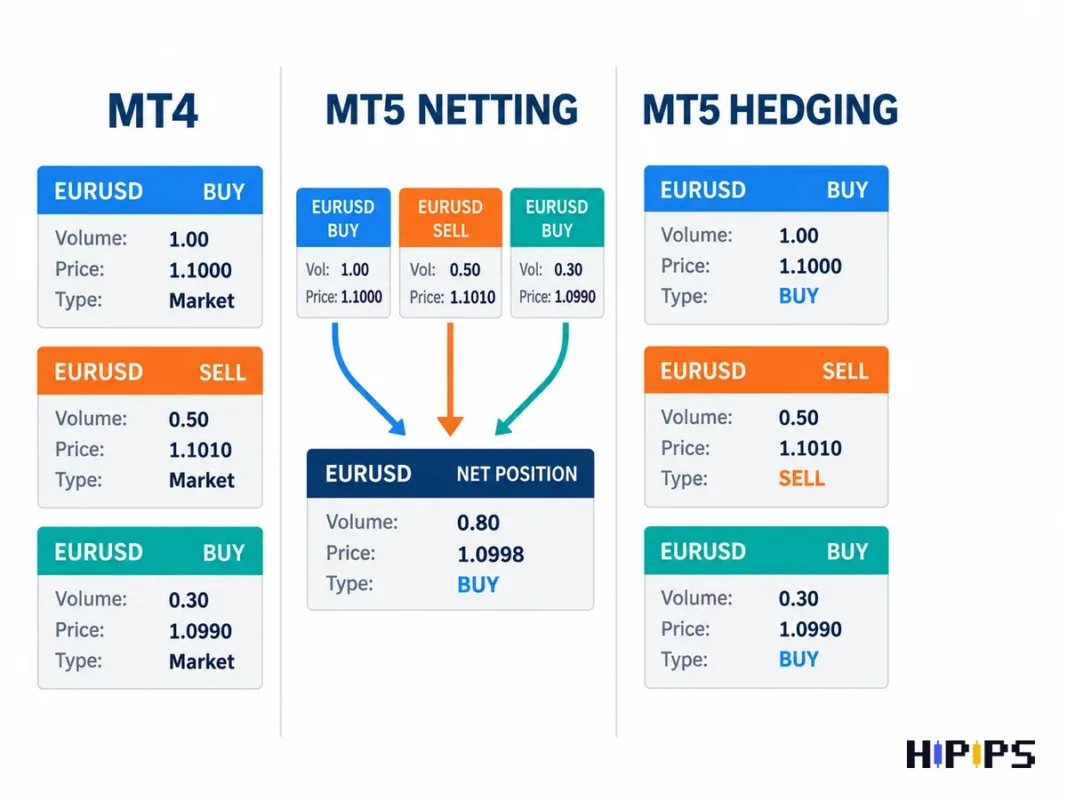
The same model matters when trades are copied between platforms: a copier sending MT4 orders to an MT5 receiver needs a hedging account on the receiver side, which the guide to the MT4 trade copier explains.
Which platform tests Expert Advisors better?
MT5 tests Expert Advisors more thoroughly than MT4, because its Strategy Tester is multi-currency and multi-threaded, runs on real ticks, simulates execution delays and can distribute optimization to the MQL5 Cloud Network.
The MT5 Strategy Tester tests and optimizes strategies across several instruments and uses all available computer resources, according to the MetaTrader 5 Strategy Tester page. Its “Every tick based on real ticks” mode tests on ticks accumulated by brokers without simulation, and random or fixed delays add execution lag to the test, according to the MetaTrader 5 help on strategy testing. MetaQuotes introduced the multi-currency tester as one of the main updates of MetaTrader 5, so a basket or multi-symbol Expert Advisor can be tested in one run only on MT5. The tester workflow for MT5 is covered in the guide on how to backtest an MT5 Expert Advisor, and the MT4 testing steps in the guide on how to backtest an Expert Advisor in MT4.
Which platform handles news filters better?
MT5 handles news filters better, because MQL5 programs read the platform’s economic calendar directly, while an MT4 Expert Advisor needs an outside data source for news times.
MQL5’s calendar functions give access to macroeconomic indicators, their release dates and importance, with values sent to the platform at the moment of publication, according to the MQL5 economic calendar reference. An MT4 news filter downloads a calendar from a website, so the terminal must allow WebRequest for that site in Tools > Options > Expert Advisors, and the filter stops working when the site changes or goes offline. The settings of a news filter, including the pause window around releases, are covered in the guide to the news filter for MT5 Expert Advisors.
MT4 or MT5: which should you choose for an Expert Advisor?
The right platform for an Expert Advisor is the one that your broker offers for your account type and that the Expert Advisor’s file is built for; MT5 is the stronger choice for a new setup when both are available, because of its tester and calendar.
The decision checks are listed below in order.
- Broker account: the platform the broker offers for the account type you trade, including funded accounts.
- Expert Advisor file: .ex4 for MT4 or .ex5 for MT5; the strategy you want decides the platform when it exists on only one.
- Testing needs: MT5 for multi-symbol strategies and real-tick tests.
- Position model: an MT5 hedging account for grid and hedging strategies.
- Existing tools: indicators, copiers and setfiles already built for one platform.
Gold traders apply the same checks with extra attention to the broker’s XAUUSD conditions, and the guide on how to choose an XAUUSD Expert Advisor lists them.
Do traders still use MT4?
Traders still use MT4 wherever their broker offers MT4 accounts, and MT4 Expert Advisors keep running on those accounts. The features that shape newer Expert Advisors, including the multi-currency tester, netting accounts, 21 timeframes and the built-in economic calendar, exist only in MT5, so a strategy that depends on them is built for MT5. Compare MT4 Expert Advisors by the build and broker requirements on each product page before choosing one for an existing MT4 account.
Which platform suits a beginner?
A beginner uses the platform that the broker offers for the account and that the chosen Expert Advisor requires; with a free choice, MT5 gives a beginner the better tester for checking an Expert Advisor before live trading. The guide to what a forex robot is explains how an Expert Advisor works before the platform choice, and MT5 Expert Advisors lists the MT5 range with setfile and build notes.










