
Error 130 Invalid Stops in MT4 and MT5: Causes and Fixes

Error 130 invalid stops is one of the most common reasons a MetaTrader EA fails to open or modify trades. It usually appears when the robot sends a stop loss, take profit or pending order price that violates broker distance rules. For a trader comparing Expert Advisors, this error is not just a coding detail. It is a buyer signal: you need to check broker StopLevel, spread, symbol suffix, setfiles and risk settings before using the EA live.

Quick Verdict
If you see Error 130 on MT4, start with broker StopLevel and the EA’s SL/TP distance. If you see invalid stops on MT5, check the trade server return code, symbol specification and whether the request places stops too close to the current Bid or Ask. On XAUUSD and indices, the same EA can work on one broker and fail on another because spread, contract size, digits and minimum stop distance are different.
| Question | Fast answer | What to do next |
|---|---|---|
| What does Error 130 mean? | Invalid stops in the trade request. | Check SL, TP, pending order distance and price normalization. |
| Is the EA always broken? | No. It can be broker restriction, setfile mismatch or tight scalping logic. | Test on demo with wider SL/TP or safer preset first. |
| Does it affect MT5 too? | MT5 uses different return codes, but invalid stops still exists. | Read the Trade tab, Experts tab and symbol specification. |
| Why is XAUUSD sensitive? | Gold spread and stop rules can widen sharply. | Compare raw spread, commission, StopLevel and session behavior. |
Main causes of Error 130 invalid stops
The official MQL4 documentation lists error 130 as invalid stops, and the OrderSend documentation explains that stop loss, take profit and pending order prices cannot be too close to the market. In real EA use, the cause is usually one of the checks below.
| Cause | What it looks like | Practical fix |
|---|---|---|
| SL/TP too close | The EA opens or modifies a trade with a very tight stop. | Increase stop loss and take profit distance in the inputs or setfile. |
| Pending order too close | Buy stop, sell stop, buy limit or sell limit is rejected. | Move pending order distance farther from current market price. |
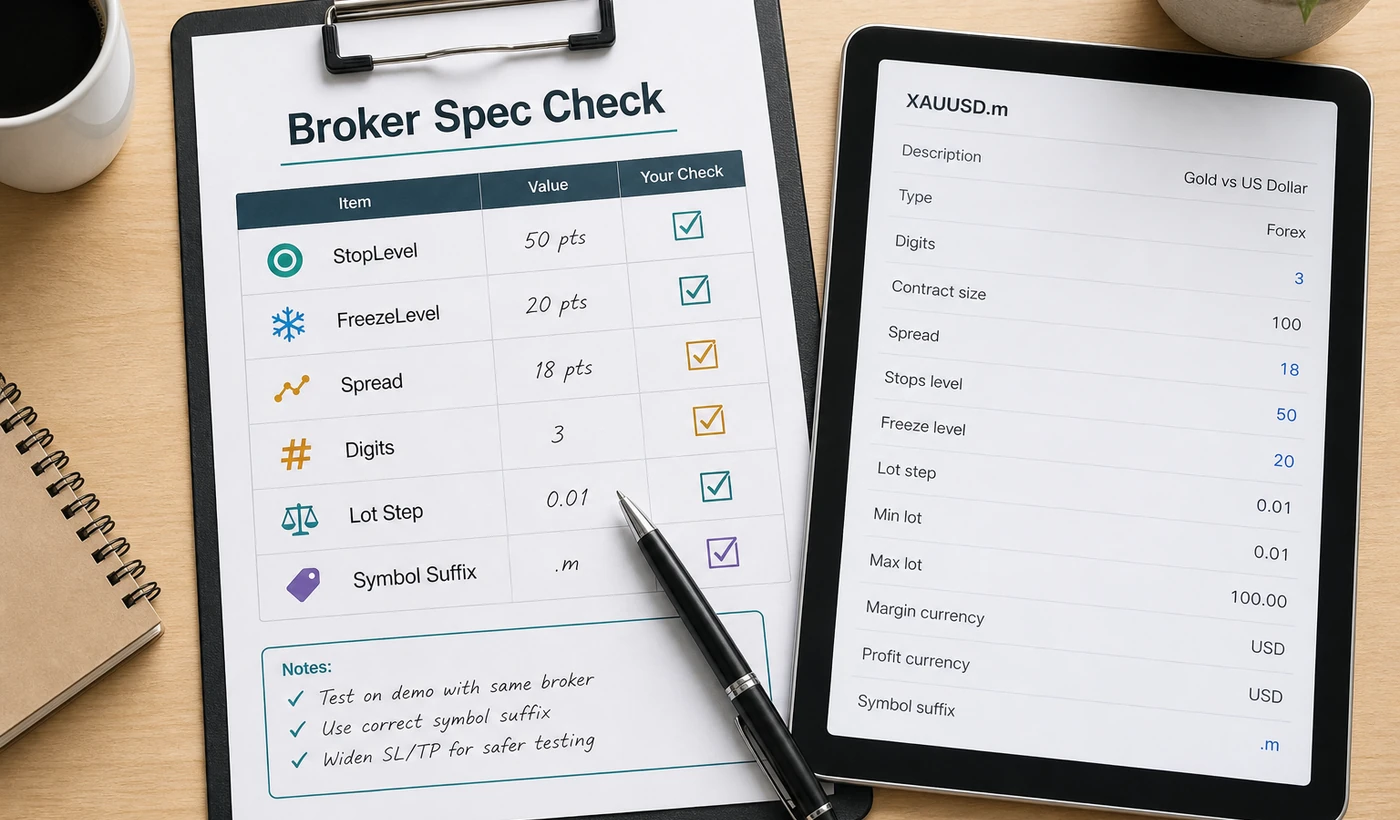
| StopLevel restriction | Broker requires a minimum distance in points. | Open symbol specification and check StopLevel before testing. |
| FreezeLevel restriction | Modification fails when price is too near the order. | Avoid trailing or modifying positions inside the frozen zone. |
| Symbol suffix mismatch | EA expects XAUUSD but broker uses XAUUSDm, GOLD or XAUUSD.pro. | Use the exact broker symbol or product symbol mapping setting. |
| Wrong digits/normalization | Prices are sent with incorrect decimal precision. | Use a current build and avoid manually editing files unless you understand the code. |
| Spread expansion | Works in quiet hours but fails during news or rollover. | Add max spread filter, avoid rollover and test during real market conditions. |
| Setfile too aggressive | A preset designed for one broker fails on another. | Start with conservative settings, then adjust after demo testing. |
MT4 Error 130 vs MT5 invalid stops
MT4 and MT5 report trade problems differently, but the buying lesson is the same: the EA must respect the broker’s symbol rules. On MT4, Error 130 is the classic invalid-stops code. On MT5, the trade result can return an invalid stops code in the request result. If you are choosing between platforms, read the MT4 products and MT5 products carefully because .ex4 and .ex5 files are different ecosystems.
| Area | MT4 | MT5 |
|---|---|---|
| File type | .ex4 executable, .mq4 source when provided | .ex5 executable, .mq5 source when provided |
| Common message | Error 130 / ERR_INVALID_STOPS | TRADE_RETCODE_INVALID_STOPS or invalid stops in trade result |
| Where to inspect | Experts and Journal tabs | Experts, Journal and Trade request result |
| Buyer check | Build compatibility and broker StopLevel | Symbol specification, filling mode, StopLevel and FreezeLevel |
Step-by-step fix checklist
- Open the MetaTrader Experts and Journal tabs. Copy the exact error line, symbol, timeframe and order type.
- Open the broker symbol specification for the traded symbol. Check StopLevel, FreezeLevel, digits, minimum lot, lot step and trading sessions.
- Compare the EA inputs with broker rules. Pay special attention to stop loss, take profit, trailing stop, break-even, pending order distance and max spread.
- If the product includes setfiles, load only one preset at a time. Do not stack multiple changes before you know which setting caused the failure.
- For XAUUSD, test during normal spread hours first. Avoid rollover and high-impact news until the setup opens, modifies and closes correctly.
- If the EA has a symbol setting, match the exact broker symbol: XAUUSD, GOLD, XAUUSDm, XAUUSD.pro or any other suffix.
- Backtest where possible, then demo forward test before live use. Use the EA backtesting checklist and EA risk settings guide before raising lot size.
XAUUSD and scalping EAs need extra care
Gold robots and scalping systems are more likely to expose invalid-stops problems because they often work with tight entries, tighter stop logic, trailing stops or pending breakout orders. That does not automatically make the robot bad. It means the broker environment matters. Before comparing any XAUUSD EA, verify spread, commission, StopLevel, symbol suffix, VPS stability and the setfile assumptions.
- If the spread is wide, a tight stop can become invalid before the order reaches the server.
- If StopLevel is high, a scalping EA may need a wider stop distance or a different preset.
- If the broker uses a suffix, product screenshots may not match your terminal symbol exactly.
- If the EA modifies stops frequently, FreezeLevel can block trailing stop or break-even changes.
EA buyer checklist before checkout
Use this table as a checklist before running any trading robot.
| Buyer check | Good sign | Warning sign |
|---|---|---|
| Platform | The page clearly says MT4, MT5 or both. | Product title and file type do not match. |
| Setfiles | Presets are explained and tied to symbol/timeframe. | One magic preset is promoted without broker context. |
| Risk controls | Lot size, max spread, SL/TP, trailing and drawdown settings are visible. | Only aggressive result claims are shown. |
| Broker fit | The page mentions spread, StopLevel, suffix or demo testing. | No execution or broker compatibility notes. |
| Support path | The product links to installation, backtest and risk guides. | No setup guide or troubleshooting route. |
Products and guides to compare on HiPips
Use the product links below as a research path, not as a promise that every EA fits every broker. Open each page, confirm platform and symbol, then test with conservative settings.
| Need | Recommended path | Why it fits this topic |
|---|---|---|
| XAUUSD MT5 scalping | TwisterPro Scalper MT5 | Relevant when spread, StopLevel and VPS quality matter. |
| Gold scalping comparison | Stable Gold Scalping EA MT5 | Good product path for XAUUSD risk and setfile checks. |
| Gold robot shortlist | Diablo EA MT5 | Useful for comparing Gold EA setup and drawdown discipline. |
| Risk-aware Gold option | Gold Safe EA | Relevant for buyers who prioritize conservative testing. |
| Product-name demand | Gold Pip Miner EA | Already appearing in GSC, so it should receive internal support. |
| Breakout EA logic | Currency Pros Breakout EA MT5 | Pending orders can trigger invalid-stops checks. |
| MT4 scalping route | Black Max Scalper | Useful when the buyer wants an MT4 comparison path. |
Related Guides to Read Next
- XAUUSD EA broker requirements for spread, symbol suffix and broker rules.
- Raw spread XAUUSD scalping EA guide for execution cost and scalping context.
- Best Gold EA for small account for lot sizing and drawdown discipline.
- MT5 EA with setfiles guide for installation and preset workflow.
- No-DLL forex EA checklist for file safety and package trust.
What not to do when Error 130 appears
- Do not immediately raise lot size to “test faster”. The issue is price distance, not proof that the strategy needs more risk.
- Do not switch to live if demo still fails to open, modify or close positions cleanly.
- Do not assume a screenshot from another broker proves your broker’s StopLevel is compatible.
- Do not edit source code unless you understand price normalization, broker digits and trade request handling.
- Do not ignore repeated invalid-stops logs. Repeated failed requests can also create support and execution problems.
Support message template
If you contact support about invalid stops, send the right details the first time. It saves time and helps support identify whether the cause is product setup, broker restriction or setfile mismatch.
| Send this | Example |
|---|---|
| Product name | TwisterPro Scalper MT5 or the exact EA you installed |
| Platform/build | MT4 build number or MT5 build number |
| Broker and account type | Raw spread, standard, cent, prop firm or demo |
| Symbol | XAUUSD, XAUUSDm, GOLD, US100, EURUSD.pro |
| Error log | Full Experts/Journal line with time |
| Setfile name | Exact preset loaded in Inputs |
| Screenshot | Inputs tab, chart and symbol specification |
References used for this guide
This article was structured after reviewing technical EA-store content patterns on ShopForexEA blog, including platform/file-type comparison style posts, then cross-checking the technical definitions against MQL4 trade server return codes, MQL4 OrderSend documentation and MQL5 trade server return codes. Product-comparison structure was also informed by public EA marketplace/listing patterns on MQL5 Market and EarnForex EA lists.
Final recommendation
Error 130 invalid stops is a useful filter for serious EA buyers. A good EA page should not only say “MT4” or “MT5”; it should help the buyer understand platform, symbol, setfiles, StopLevel, spread, lot size and drawdown before checkout. If the EA passes those checks on demo, the purchase decision becomes cleaner. If it fails, fix the environment first instead of forcing the robot onto a broker setup it was not designed for.
FAQ
What is Error 130 invalid stops in MT4?
It is the MT4 trade-server error for invalid stops. In normal EA use, it often means stop loss, take profit or pending order distance is too close to current market price or violates broker rules.
Can a good EA still show invalid stops?
Yes. A good EA can still fail on a broker with strict StopLevel, wide spread, symbol suffix mismatch or a setfile built for different trading conditions.
Why does XAUUSD trigger this more often?
Gold can have wider spread, different contract rules and fast price movement. Tight scalping or breakout settings may need extra broker checks on XAUUSD.
Should I change the EA code?
Start with settings, setfiles and broker specification. Code changes should be a last step and only done by someone who understands MetaTrader trade requests and price normalization.










One thought on “Error 130 Invalid Stops in MT4 and MT5: Causes and Fixes”