
No-DLL Expert Advisors: what DLL imports mean in MT4 and MT5

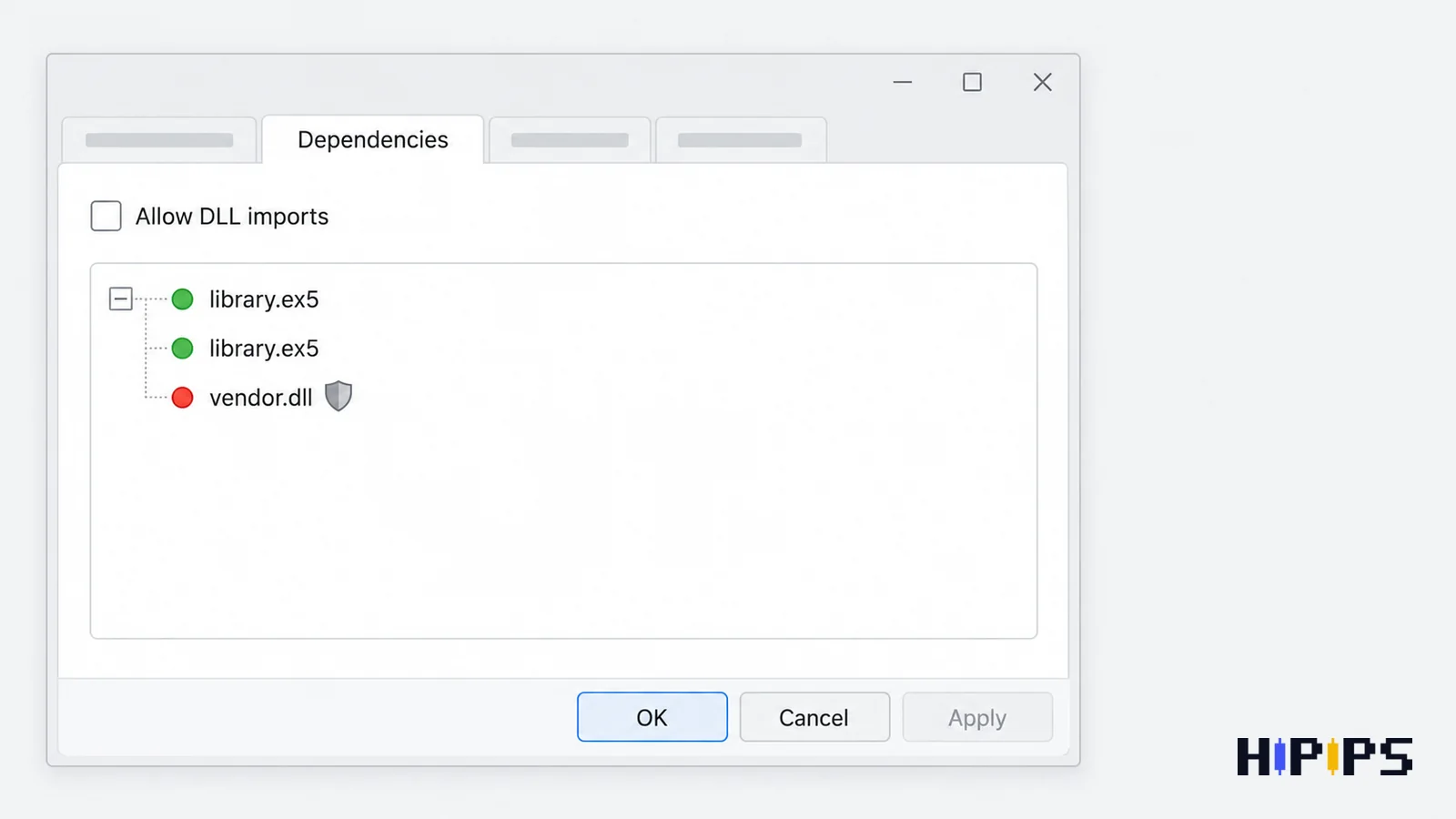
A no-DLL Expert Advisor is an Expert Advisor that runs entirely in MQL4 or MQL5 code without importing functions from Windows DLL files, so it works with the Allow DLL imports option switched off.
A DLL import changes where an Expert Advisor can run and how much trust it needs. It says nothing about the strategy’s results. This guide explains what a DLL import is, how to check whether an Expert Advisor uses one, where DLL Expert Advisors cannot run, whether a no-DLL Expert Advisor is safer, how to allow DLL imports when they are needed, and which errors a blocked DLL causes. This guide is part of the HiPips path to choose, test and run an MT4 or MT5 Expert Advisor, which starts with what an Expert Advisor is.
What is a DLL import in an Expert Advisor?
A DLL import in an Expert Advisor is a call from MQL code to a function inside a Windows dynamic-link library (.dll file), which lets the Expert Advisor run native Windows code that MQL itself does not provide.
MQL5 imports functions from compiled MQL5 modules (.ex5 files) and from operating system modules (.dll files) with the #import directive, according to the MQL5 reference on importing functions. Vendors use DLLs for licence checks, network connections, data processing and access to other programs. MQL programs work inside restrictions set by the terminal, such as a file sandbox, while a DLL function runs as ordinary Windows code. MetaTrader labels the option that allows it “Allow DLL imports (potentially dangerous, enable only for trusted applications)” and recommends keeping it off for unfamiliar Expert Advisors, according to the MetaTrader 5 platform settings help.
How do you know whether an Expert Advisor uses DLLs?
An Expert Advisor uses DLLs when its MT5 properties window shows a Dependencies tab with red icons, when its package includes .dll files, or when its log reports that DLL calls are not allowed. The checks are listed below.
- MT5 Dependencies tab: the tab appears when the Expert Advisor imports functions from other .ex5 or DLL files; green icons mark calls to MQL5 programs and red icons mark calls to DLL functions, according to the MetaTrader 5 help on Expert Advisors.
- Missing OK button: in MT5, the start window hides the OK button when the Expert Advisor uses a DLL and Allow DLL imports is off.
- Package contents: a .dll file in the download, meant for the MQL4\Libraries or MQL5\Libraries folder.
- Product documentation: a vendor that requires DLL imports states it on the product page and in the manual.
- Experts log: an MT4 Expert Advisor that tries a DLL call with the option off logs error 4017, DLL calls are not allowed.
Where can a DLL Expert Advisor not run?
A DLL Expert Advisor cannot run on MetaQuotes Virtual Hosting, cannot be sold on the MQL5 Market, and cannot be optimized on MQL5 Cloud Network or remote agents.
The table below lists each restriction with its official source.
| Environment | DLL rule | Source |
|---|---|---|
| MetaQuotes Virtual Hosting | No DLLs allowed; a program that calls a DLL function stops with a critical error | MetaTrader Virtual Hosting rules |
| MQL5 Market | Products must not contain calls to any DLL, including Windows system libraries | MQL5 Market rules |
| Remote agents and MQL5 Cloud Network | DLL calls are prohibited on remote agents | MetaTrader 5 help on remote agents |
| Android and iPhone apps | No Expert Advisors at all | Platform limitation |
A DLL Expert Advisor runs on a Windows computer or on a third-party Windows VPS, and its optimization runs on local agents only. The hosting options for both kinds of Expert Advisor are compared in forex VPS for Expert Advisors.
Is a no-DLL Expert Advisor safer?
A no-DLL Expert Advisor is safer for the computer, because it runs only MQL code inside the terminal’s restrictions, and it is no safer for the trading account, because a DLL import says nothing about strategy risk.
Applications from unknown sources can cause damage through third-party DLLs, which is why MetaTrader 5 help warns against enabling DLL imports when the application’s safety is uncertain. A DLL from an identified developer with a documented purpose, such as a licence check, carries a different level of trust from an unexplained DLL in a file of unknown origin. Account risk comes from the strategy’s lot size, stops and recovery logic, which the guide to Expert Advisor risk settings covers, and a verified trading history matters more than the DLL question; the guide on how to verify a forex robot before buying explains the checks.
How to allow DLL imports when an Expert Advisor needs them
Allowing DLL imports safely means enabling them for one known Expert Advisor after checking what the DLL is and who made it, while keeping the platform-wide default switched off. The steps are listed below.
- Confirm in the vendor’s documentation that the Expert Advisor needs a DLL and what the DLL does.
- Note the DLL file names shown in the MT5 Dependencies tab and compare them with the files in the package.
- Scan the .dll files with up-to-date antivirus software before copying them into the Libraries folder.
- Keep Allow DLL imports off in Tools > Options > Expert Advisors, so it stays off by default for every other program.
- Tick Allow DLL imports only in this Expert Advisor’s properties: the Dependencies tab in MT5, the Common tab in MT4.
- Run the Expert Advisor on a demo account first, in a terminal that holds no other live accounts.
- Read the Experts and Journal tabs for DLL errors after the first start.
MT5 treats the platform option as the default value for new program starts, so the per-program tick in step 5 overrides it for one Expert Advisor only. The rest of the installation follows the usual path, covered in the guides to install an Expert Advisor and setfiles in MT5 and to install an Expert Advisor and setfiles in MT4.
Which errors does a blocked or missing DLL cause?
A blocked or missing DLL stops an Expert Advisor with a DLL error in the Experts tab, and the MQL4 code names the cause: permission off, library not found, or a failed function call.
The table below lists the MQL4 codes, with names from the MQL4 error code list.
| MQL4 code | Error name | Usual cause | Fix |
|---|---|---|---|
| 4017 | DLL calls are not allowed | Allow DLL imports is off | Enable it for this Expert Advisor after the checks above |
| 4018 | Cannot load library | The .dll file is missing or in the wrong folder | Copy the file into MQL4\Libraries and restart |
| 4019 | Cannot call function | The DLL version does not match the Expert Advisor | Install the DLL shipped with this Expert Advisor version |
| 4020 | Expert function calls are not allowed | Calls to other MQL programs are blocked | Allow imports in the Expert Advisor’s properties |
| 4023 | DLL-function call critical error | The DLL function failed inside Windows | Contact the vendor with the log |
In MT5, a DLL Expert Advisor with imports off does not start at all, because the OK button is hidden. An Expert Advisor that starts without errors and still opens no trades has a different cause, and the checklist for an Expert Advisor not trading finds it.
Installation safety checklist for any Expert Advisor
An Expert Advisor installation is safe when the file’s source is known, the package matches the platform, permissions stay at the minimum the manual requires, and the first run happens on demo. The checklist is below.
- Source: the developer or seller is identifiable and the file comes from their download, not a re-upload.
- Package: .ex4 for MT4 or .ex5 for MT5, with setfiles, indicators and libraries listed in the manual.
- Build: the platform build meets the minimum stated for the file.
- Permissions: DLL imports and WebRequest enabled only when the manual requires them, and only for this Expert Advisor.
- Terminal: one new Expert Advisor per clean terminal profile, so a conflict points to one program.
- First run: demo account, with the Experts and Journal tabs read after loading.
Does a no-DLL Expert Advisor trade better?
A no-DLL Expert Advisor does not trade better or worse than a DLL Expert Advisor, because the DLL question concerns where and how the program runs, not its entry and exit rules. The practical gains of no-DLL are wider hosting choice, including MetaQuotes Virtual Hosting, and optimization on MQL5 Cloud Network; the guide to MT5 Expert Advisor optimization explains when cloud optimization helps. Compare MT4 and MT5 Expert Advisors by the DLL and build notes on each product page before choosing where to run one.










